
A black X-shaped logo in a white square with the text "Nexus" next to it.
Introducing workflow automation with Nexus

The foundation for lower integration costs

Shopware Nexus replaces fragile, custom built integrations with a native, event driven orchestration layer for modern commerce stacks. Instead of rebuilding and maintaining system connections project by project, merchants and partners gain a scalable foundation that reduces cost, risk, and ongoing maintenance effort.

Free introductory phase currently planned until September 1, 2026.

40%

Lower integration costs (up to)¹

Eliminate fragile middleware, and replace custom scripts with reusable automation. Lower maintenance effort, reduce upgrade risks, and create a more scalable, cost efficient integration foundation.
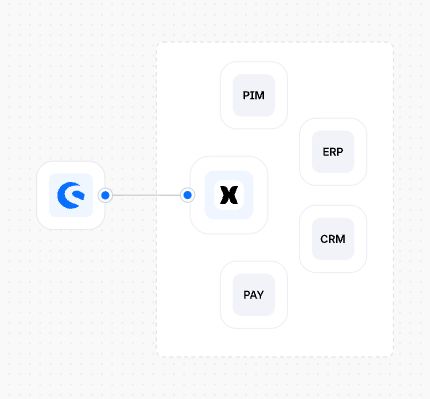
Diagram showing Shopware connected to ERP, PIM, CRM and payment systems through a central event-driven orchestration layer replacing custom middleware.
Example workflow where an incoming order in Shopware automatically triggers real-time actions such as a Slack notification and an API call.
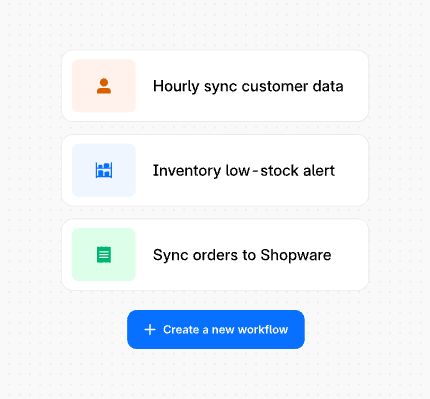
Interface displaying reusable workflow templates such as hourly customer data sync, low-stock alerts and order synchronization, with an option to create a new workflow.
Diagram showing Shopware connected to ERP, PIM, CRM and payment systems through a central event-driven orchestration layer replacing custom middleware.

Stop rebuilding integrations project by project

Replace fragile scripts and patchwork middleware with a native, event driven orchestration layer. Connect Shopware to ERP, CRM, PIM, and payment systems that reduce development effort and debugging time. Agencies spend less time fixing integrations and more time delivering impact.

Example workflow where an incoming order in Shopware automatically triggers real-time actions such as a Slack notification and an API call.

Turn every store event into an automated workflow

Respond to orders, signups, payments, and returns the moment they happen. Route events to Slack, your helpdesk, your accounting system, or any API endpoint

Interface displaying reusable workflow templates such as hourly customer data sync, low-stock alerts and order synchronization, with an option to create a new workflow.

Build once, reuse everywhere

Turn recurring integration patterns into standardized workflows that work across shops and clients. Reduce custom development effort, minimize upgrade breakages, and lower long-term integration cost by making every workflow reusable and visually maintainable.

Icon Quote
Sam Crudge Hill
Nexus Product Manager, Shopware

Icon Sparkles

On average, more than half of project effort² is lost due to custom middleware. With Nexus, agencies launch projects faster, with less custom development and fewer issues during updates. Merchants reduce their total cost of ownership, while teams spend less time fixing.

52%

Frequently asked questions

Getting started
Benefits of Shopware Nexus
Pricing
Vision & Roadmap

How can I sign up to Shopware Nexus?

If you already have an account, you can get started directly through your Shopware Admin in just a few steps.

  1. Install the Nexus service in your Shopware Admin. Go to Settings → Services and activate the Shopware Nexus Event Ingestion Service.

  2. Open the Nexus portal in your browser.

  3. Review and accept the terms and conditions to complete your setup.

Once completed, your store is connected and ready to use Nexus!

Do I need developer support to use Shopware Nexus?

Today, Shopware Nexus is primarily designed for developers and technical teams, so some technical knowledge may be helpful depending on your use case.

That said, we are continuously improving usability and expanding the interface to make Shopware Nexus more accessible for merchants and operational teams. Our goal is to enable businesses to manage and extend workflows independently, without relying heavily on developer support.

What is the difference between Shopware Nexus and the Flow Builder?

Flow Builder is part of the Shopware Administration and is designed for creating structured workflows within Shopware. It allows you to define step by step automations based on predefined triggers and conditions inside your commerce environment.

Shopware Nexus goes beyond internal Shopware workflows. It is built to orchestrate processes across systems, connecting Shopware with the broader technology landscape such as ERP, CRM, PIM, and other third party platforms.

While Flow Builder focuses on sequential automation within Shopware, Nexus is built on an event driven, AI powered architecture. It reacts in real time to events across connected systems, enabling dynamic, cross system orchestration rather than fixed step chains.

As an agency, what is the core benefit of Shopware Nexus?

You don’t need to rely on external middleware, Shopware Nexus is reducing TCO for merchants, helping agencies deliver projects, faster, cheaper and more standardized. Agencies will need less time to integrate, monitor and debug data flows between systems and therefore spending less resources on a project.

How will Shopware Nexus help early adopters stay competitive in the Shopware ecosystem?

Nexus helps you deliver projects faster by simplifying integrations and enabling reusable workflows across customers and use cases. Because workflows and connectors remain compatible across Shopware updates, teams spend less time on maintenance and ongoing technical work. This reduces project costs, improves efficiency, and creates more room to offer additional value-added services to customers. Nexus, and the data context of the system landscape it operates within, will allow you to recommend other systems that can help provide more value to your customers - for example, recommending complementary tools or making it easier to migrate from outdated proprietary systems, such as legacy PIM solutions.

How will Showare Nexus be billed in future?

Starting in September, guide pricing will be be around €10 per 1,000 executions. The plan you are on will also, most likely, get added benefits including, discounts, included volumes, and additional premium features. Please note that this pricing is in beta phase and may be subject to change.

What other connectors will Shopware be investing into and when will those become available for the ecosystem?

Currently under review for the initial release:

  • Pimcore (PIM)

  • Erpnext (ERP)

  • Netsuite (ERP)

  • Klaviyo (CRM)

  • Hubspot CRM (CRM)

  • Odoo (ERP)

  • Zoho-crm (CRM)

  • dropbox (file sharing)

  • Magento Migration

  • Akeneo (PIM)

  • Metabase (Database connection)

  • Brevo (CRM)

Contact us for further requests at connectors@shopware.com Under consideration for future releases:

  • Todoist (to do list manager)

  • SendGrid (email)

  • Resend (email)

  • mailjet (email)

  • Smarsheet (accounting)

  • Google Calendar (Calendar)

  • iCal Generator (calendar)

  • boxdev (file sharing)

  • ddownload (file sharing)

  • file.io (file sharing)

  • gofile (file sharing)

  • google drive (file sharing)

  • one drive (File sharing)

  • Storacha (file sharing)

  • google sheets API (document)

  • OpenQR (QR Code generator)

  • QRCodeMonkey (QR Code generator)

  • GoQR (QR Code generator)

  • Airtable (workflow manager)

  • Notion (workflow manager)

  • Odoo (CRM)

What is Shopware’s roadmap for plugins, apps, and integrations going forward?

We will continue to support Plugins and Apps for integration and are fully committed to our store and ecosystem. Going forward, Shopware Nexus will become the preferred solution for connecting and synchronizing data between systems, which may reduce the need for standalone integration plugins over time. Plugins and apps however will still be needed for extending Shopware functionality, customizing storefront experiences, and modifying platform behavior. As a simple guideline:

  • Use Shopware Nexus to connect and synchronize systems

  • Use plugins or apps to customize and extend Shopware itself

Start building with Nexus today.

Built for teams that want to scale without integration overhead.

Copied to clipboard